Set Up Your Profile
After registration, you should set up your profile so EduGrade is optimally configured for your school type.
Open Profile Settings
- Click Settings in the sidebar
- Select the Profile section
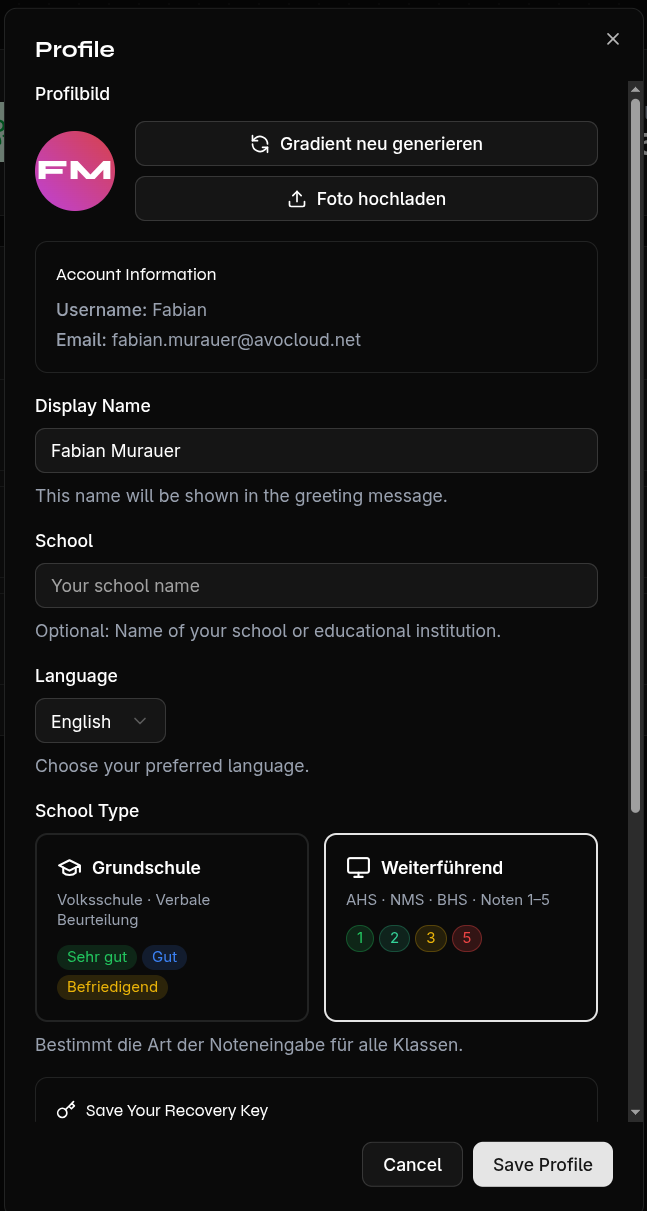
Display Name & School
- Display Name — Shown as a greeting on the home page
- School Name — Optional, for your own reference
Choose School Type
The school type determines how grades are displayed in EduGrade:
| School Type | Grading System |
|---|---|
| Primary School | Verbal assessment (Very good, Good, Satisfactory) |
| Secondary School | Numeric grades (1–5) |
Choose the appropriate school type for your school.
Set Default Subjects
Define subjects that are automatically created for every new class:
- Scroll to the Default Subjects section
- Enter the subject name and click Add
- Repeat for all desired subjects
These subjects are automatically created with each new class — but you can always customize them per class.
Change Language
EduGrade is available in German and English. You can change the language at any time in the profile settings.
Theme (Light/Dark)
Switch between light and dark mode:
- Via the toggle in the sidebar
- Or in Settings
Your choice is saved and applied on your next login.